
Polycarbonate is 250 times stronger than glass, but it cuts cleanly with standard shop tools when you use the right blade and speed. The wrong setup melts the plastic, chips the edge, or cracks the sheet. This guide covers six cutting methods for polycarbonate sheets from 1 mm thin film to 1/2 inch thick panels, with blade specs, RPM settings, and step-by-step instructions for each.

Before You Cut: Safety and Preparation
Polycarbonate does not shatter like glass, but cutting it produces small chips and fine dust. Protect yourself and get a cleaner cut with these steps:
- Wear safety goggles and a dust mask. Flying chips can scratch your eyes. Fine polycarbonate dust irritates your lungs
- Leave the protective film on. The plastic film that covers both sides of the sheet prevents scratches from clamps, guides, and the saw base plate. Peel it off after you finish cutting
- Mark your cut line on the film with a fine-tip marker and a straight edge. For extra chip protection, apply masking tape along both sides of the cut line
- Clamp the sheet firmly to your workbench or saw table. Polycarbonate flexes under vibration. Unsecured sheets chatter against the blade and produce a rough, chipped edge
- Support the offcut side. If the piece you are cutting off hangs unsupported, it will flex downward as the cut finishes and crack or chip the last inch of the edge
Method 1: Scoring and Snapping (Thin Sheets Under 3 mm)
For polycarbonate sheets under 3 mm (about 1/8 inch), you do not need a power tool. A sharp utility knife or box knife and a straight edge are enough.
Steps:
- Place the sheet on a flat surface with the cut line overhanging the edge of your workbench by about 1 inch
- Align a metal straight edge or ruler along the cut line
- Score the sheet by drawing the utility knife along the straight edge with firm, steady pressure. Make 5-10 passes, deepening the groove each time
- Flip the sheet and score the same line on the opposite side
- Align the scored line with the edge of the workbench and apply downward pressure on the overhanging side. The sheet will snap cleanly along the score
- Smooth the edge with 220-grit sandpaper if needed
Best for: Small panels, replacing flat light cover inserts, trimming thin polycarbonate glazing for picture frames or small windows.
Limitations: Only works on flat, thin sheets. Not suitable for curves, thick panels, or multiwall polycarbonate.
Method 2: Circular Saw (Straight Cuts on Sheets 1/8 Inch and Thicker)
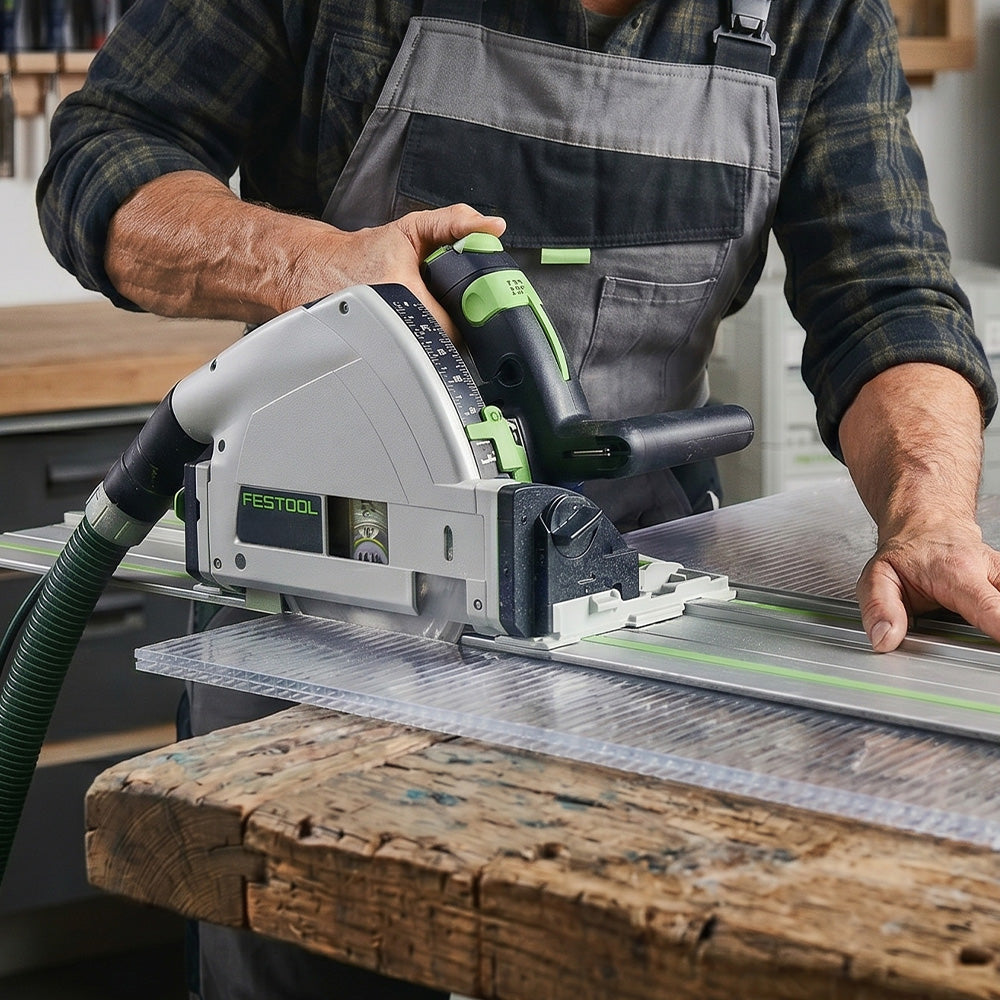
A circular saw is the fastest tool for long, straight cuts on polycarbonate sheets 1/8 inch (3 mm) and thicker. It is the best choice for cutting large panels down to size for light covers, machine guards, and glazing projects.
Blade selection:
- Use a fine-toothed carbide-tipped blade with 60 to 80 teeth (for a standard 7-1/4 inch blade)
- Triple-chip grind (TCG) blades produce the cleanest edges with the least melting
- Do NOT use wood-cutting blades (too few teeth) or abrasive blades (generate excessive heat)
Speed settings:
- Set blade speed to 3,500 to 4,000 RPM for sheets up to 1/4 inch
- Reduce to 2,500 to 3,000 RPM for sheets 1/4 inch and thicker to prevent heat buildup
- General rule: spin fast, feed slow. Let the blade do the work
Steps:
- Clamp the sheet to sawhorses or a workbench with the cut line extending past the edge
- Set the blade depth so only 1/4 inch of the teeth extend below the bottom of the sheet
- Align the saw's base plate with the cut line and start the saw before contacting the sheet
- Feed the saw slowly and steadily through the polycarbonate. Do not force it or stop mid-cut
- Let the offcut fall free or have a helper support it to prevent cracking at the end of the cut
Best for: Large rectangular panels, fluorescent light cover replacements, machine guard panels, greenhouse glazing.
Method 3: Jigsaw (Curves, Cutouts, and Custom Shapes)
A jigsaw is the right tool when you need curved cuts, circular cutouts, or non-standard shapes. It is the only common handheld tool that can cut curves in polycarbonate without a CNC machine.
Blade selection:
- Use a fine-toothed metal-cutting blade (T-shank, 10 to 18 TPI)
- Bi-metal blades last longer than carbon steel when cutting plastic
- Avoid coarse wood-cutting blades. They will chip and crack the polycarbonate
Speed and technique:
- Set the jigsaw to medium speed (setting 2 or 3 out of 5 on most jigsaws)
- Turn OFF the orbital action setting. Orbital motion lifts the blade on the upstroke, which causes chipping on the top surface
- Move the jigsaw slowly and steadily. Let the blade cut without pushing hard
- For tight curves, drill a pilot hole first and insert the blade into the hole to start your cut
Best for: Cutting circular openings for recessed lights, trimming polycarbonate panels around pipes or conduit, creating custom shapes for decorative lighting, adapting panels to fit irregular fixtures.
Method 4: Table Saw (Long Rip Cuts and Repetitive Sizing)
A table saw gives you the most precise straight cuts, especially for ripping long sheets to consistent widths. If you are cutting multiple panels to the same size, a table saw with a fence is the most efficient method.
Blade selection:
- Use a 60 to 80 tooth triple-chip grind (TCG) carbide blade
- A 10-inch blade with 80 teeth is ideal for most polycarbonate work
- Avoid standard combination blades (too aggressive for plastic)
Speed settings:
- Sheets under 1/8 inch: blade speed around 2,000 surface feet per minute
- Sheets 1/8 to 1/4 inch: 1,500 surface feet per minute
- Sheets over 1/4 inch: 1,000 surface feet per minute
Steps:
- Set the fence to your desired width
- Raise the blade so it extends 1/4 inch above the sheet surface
- Feed the sheet slowly into the blade with steady, even pressure
- Use a push stick for narrow cuts. Keep your hands well away from the blade
- Support the offcut side to prevent it from dropping and cracking at the end of the cut
Best for: Cutting multiple light cover panels to identical widths, long rip cuts for sign panels, production runs of machine guard blanks.
Method 5: Band Saw (Thick Sheets and Stacked Cuts)
A band saw handles thick polycarbonate (1/4 inch and up) and can cut stacked sheets for production work. It also cuts gentle curves that a circular saw or table saw cannot.
Blade selection:
- Use a skip-tooth or hook-tooth blade with 3 to 6 TPI for thick sheets
- For thinner sheets (under 1/4 inch), use 10 to 14 TPI
- Wider blades (1/2 inch) track straighter. Narrower blades (1/4 inch) handle tighter curves
Speed:
- Set blade speed to 2,500 to 3,000 surface feet per minute
- Reduce speed for thicker stacks to prevent heat buildup
Best for: Cutting thick polycarbonate panels for security glazing, stacking and cutting multiple sheets at once, gentle curves on heavy-gauge material.
Method 6: CNC Router and Laser Cutting (Precision and Production)
For complex shapes, tight tolerances, or high-volume production, CNC routers and laser cutters produce the cleanest results. Most DIY users will not have these tools, but fabrication shops and sign companies use them daily.
CNC router settings:
- Spindle speed: 18,000 to 24,000 RPM
- Use a single-flute or two-flute upcut spiral carbide bit
- Feed rate: 60 to 120 inches per minute depending on thickness
- Use air blast (not coolant) to clear chips and prevent melting
Laser cutting notes:
- CO2 lasers cut polycarbonate but produce yellowed, discolored edges
- Polycarbonate does not laser-cut as cleanly as acrylic. The edges will be rougher and may need finishing
- For clean, flame-polished edges on transparent panels, acrylic is a better material for laser cutting
Best for: Custom-shaped diffuser panels, production sign faces, intricate cutouts, machine guard windows with bolt hole patterns.
Quick Reference: Match the Tool to Your Polycarbonate Thickness
| Sheet Thickness | Best Tool | Blade / Bit | Speed | KASTLITE Application |
|---|---|---|---|---|
| Under 3 mm (1/8 in) | Utility knife (score + snap) | Sharp blade, 5-10 passes | Manual | Small light cover inserts, thin glazing |
| 1/8 in (3 mm) | Circular saw or jigsaw | 60-80 tooth carbide (circ), 10-18 TPI metal (jig) | 3,500-4,000 RPM | Lamp post globe panels, LED diffusers |
| 3/16 in (4.5 mm) | Circular saw or table saw | 60-80 tooth TCG carbide | 3,000-3,500 RPM | Sneeze guards, protective barriers |
| 1/4 in (6 mm) | Table saw or circular saw | 80 tooth TCG carbide | 2,500-3,000 RPM | Machine guards, safety glazing |
| 3/8 in - 1/2 in | Table saw or band saw | TCG carbide (table), 3-6 TPI skip-tooth (band) | 1,000-2,500 SFM | Security panels, skylights |
| Any (curved cuts) | Jigsaw or band saw | 10-18 TPI fine metal blade | Medium | Custom fixture cutouts, decorative panels |
| Any (precision/production) | CNC router | 1-2 flute upcut carbide | 18,000-24,000 RPM | Sign faces, complex shapes, bolt patterns |

How to Finish Polycarbonate Edges After Cutting
A freshly cut edge is usually rough or slightly melted. Finishing takes a few minutes and makes the final result look professional.
- Sanding: Start with 120-grit sandpaper to remove saw marks, then move to 220-grit for a smooth finish. Wet-sand with 400-grit or higher for a polished look
- Scraping: A sharp deburring tool or the back of a utility knife blade removes small chips and burrs quickly
- Flame polishing: A propane torch passed quickly along the edge melts it smooth and clear. This works on polycarbonate but requires practice. Move too slowly and the edge yellows or warps. Flame polishing is easier on acrylic than polycarbonate
- Buffing: A cotton buffing wheel with plastic polish compound produces a glass-clear edge on thicker sheets
For lighting applications where the edge will be visible (pendant fixtures, display panels), finishing matters. For machine guards or hidden panels, a quick pass with 220-grit sandpaper is enough.

Common Mistakes That Ruin Polycarbonate Cuts
- Using a wood blade with large teeth: Causes severe chipping and cracking. Always use a fine-toothed blade rated for plastic or non-ferrous metal
- Pushing too fast: Excessive feed pressure generates friction heat that melts the polycarbonate and welds the cut closed behind the blade
- Removing the protective film before cutting: The saw base plate scratches the exposed sheet surface. Leave the film on until the project is installed
- Not clamping the sheet: Vibration from power tools makes the sheet chatter against the blade, producing a ragged, uneven edge
- Cutting multiwall polycarbonate with the wrong tool: Multiwall (twin-wall, triple-wall) sheets crush if clamped too tightly or cut with excessive downward pressure. Use a circular saw with light pressure and a fine blade
- Stopping mid-cut: Pausing a circular saw or table saw mid-cut lets the blade heat up in one spot, melting a divot into the edge. Complete each cut in one steady pass
Frequently Asked Questions
Can I cut polycarbonate with a Dremel?
Yes, for small cuts and detail work. Use a reinforced cut-off wheel or a spiral cutting bit. A Dremel works well for cutting small holes, notches, and fine detail, but it is too slow for long straight cuts on full sheets.
Will polycarbonate crack when I cut it?
Not if you use the right blade and technique. Polycarbonate flexes rather than shattering. Cracking usually happens when the sheet is not clamped, when a coarse blade generates excessive vibration, or when the offcut side is not supported.
What is the difference between cutting polycarbonate and acrylic?
Acrylic is harder and more brittle. It scores and snaps cleanly up to 1/4 inch thick. Polycarbonate is tougher and more flexible, so it only scores and snaps reliably under 3 mm. For thicker polycarbonate, you must use a power saw. Acrylic also laser-cuts much more cleanly than polycarbonate. For a full comparison, see our Acrylic vs. Polycarbonate guide.
Can I use a hacksaw to cut polycarbonate?
Yes, for small pieces and short cuts. Use a blade with 18 to 32 TPI and cut slowly. A hacksaw works in tight spaces where a power tool does not fit, but it leaves a rougher edge that needs more finishing.
How do I cut a circle in polycarbonate?
Drill a starter hole inside the circle with a standard drill bit. Insert a jigsaw blade into the hole and cut along the marked circle. For small holes (under 2 inches), use a hole saw designed for plastic or metal.
Do I need a special blade for multiwall polycarbonate?
The same fine-toothed circular saw blade that works on solid polycarbonate works on multiwall panels. The key difference is pressure: apply less downward force to avoid crushing the internal channels. Seal the open cells with aluminum or U-channel tape after cutting to keep out dust and moisture.
Shop Polycarbonate Sheets at KASTLITE
KASTLITE stocks clear and tinted polycarbonate sheets in thicknesses from 1/16 inch to 1/2 inch, plus polycarbonate lamp post globes and light covers. Whether you need a single panel for a DIY project or bulk sheets for a commercial install, we ship across the United States.
Replacing a light cover? Our measurement guide covers standard sizes and step-by-step instructions for every fixture type.
Working with PETG instead? The same blades work. Learn more about PETG in our PETG material guide.
For help choosing the right thickness, see our plastic sheet thickness guide. For a full comparison of polycarbonate to other materials, check our material properties comparison guide.
Browse our polycarbonate sheets collection or contact our team for custom cut-to-size orders.